
BEFORE DELETING A CONTACT: Once a contact is deleted, all associated data such as conversations, notes, tasks, and activity history is permanently lost. Restoring a deleted contact will not recover this associated data. Please ensure to back up any important information before proceeding with deletion.
Double-Check Before Deletion: Ensure you have selected the correct contacts to avoid accidental data loss.
Backup Important Data: Export contacts to a CSV file before deletion for record-keeping.
Step 1: Open Contacts Page
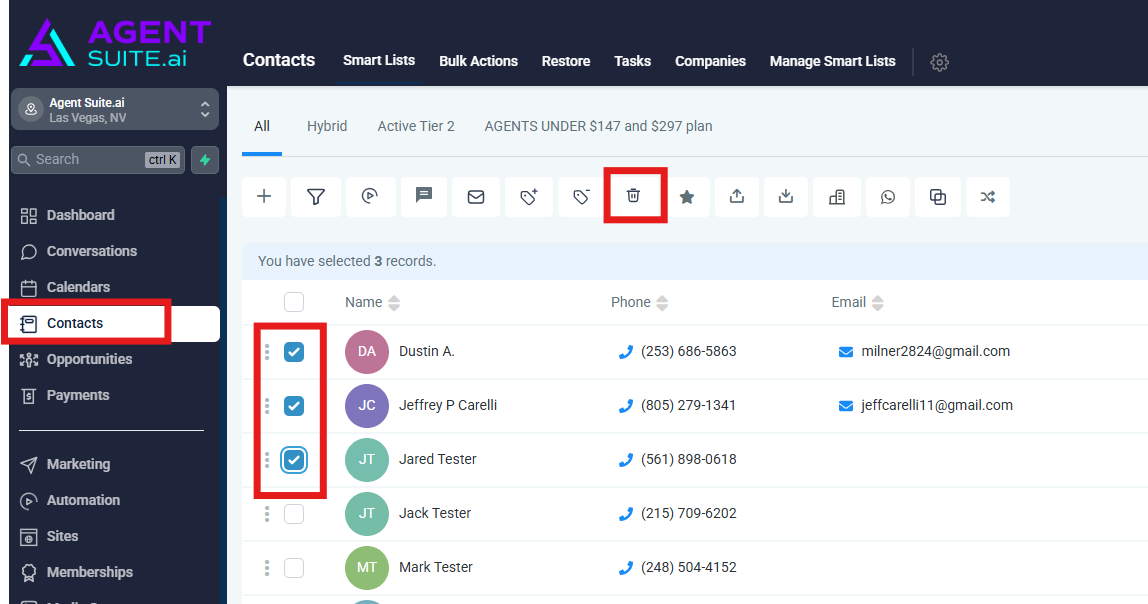
Navigate to the Contacts section in your Agent Suite dashboard.
Step 2: Select Contacts
There are two different ways to select contacts. You can either select all contacts on a page (or all contacts in Agent Suite) by clicking the checkbox in the header of the contacts list, or you can select individual contacts by clicking the checkbox next to their name.
Select one or more contacts by checking the boxes next to their names.
Step 3: Delete Contacts
Click the Delete button at the top of the contact list.
Step 4: Confirm Deletion
Confirm the deletion by typing DELETE in the confirmation text box.
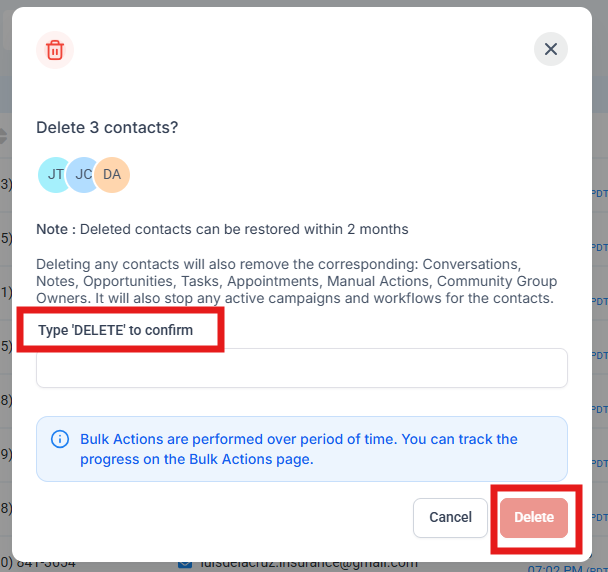
Monitor the deletion status on the Bulk Actions page.