Number has not been A2P verified
A2P is the messaging standard required for sending SMS/MMS message to US mobile numbers using a local business phone numbers.
If your number whether purchased through Agent Suite or elsewhere is not A2P verified, you won’t be able to send messages using it.
To enable messaging, your number must go through the A2P registration and verification process.
Authenticate Error
When the Hybrid Wallet Balance under AI Center- Billing is already in negative, the messages will not send with an error: Authenticate.
Replenish your wallet balance and wait for 10-15mins for the system to fully reconfigure the balance and the transaction will resume.
Contact has DND (Do Not Disturb) Enabled
When DND is enabled for a contact on the message channel or overall, Agent Suite doesn't send
the message and displays an error in the conversation screen.
Remove DND status from the contact to resume message sending.
The Number Is a Landline
When number validation is enabled, the system checks if a number is message-capable (i.e.,
not a landline). If not, it prevents the message from being sent.
Use a mobile number instead or disable number validation if necessary.
Sub-Account Is New and Undergoing Ramped Sending
GoHighLevel restricts message volume for new sub-accounts to prevent spam, gradually
increasing limits over time.
Wait for limits to increase automatically, or have the agency request a lift.
Sub-Account Has Hit Its Daily Message Limit
Each sub-account has a daily message limit set by the agency. Bulk and automated
messages stop sending once this limit is hit, but individual replies can still
be sent. Agencies have control over these limits for each sub-account.
Adjust daily limits from the agency settings, or wait until the next day.
Sub-Account Sending Suspended Due to High Errors, Opt-Outs, or Complaints
Sub-accounts exceeding spam, opt-out, or carrier complaint thresholds have message sending suspended. Attempts to send messages during suspension will be skipped and display an error.
Follow deliverability best practices and contact support if needed.
30003: Unreachable Destination Handset
The recipient's phone may be off, have no signal, be a landline, or there may be a
mobile carrier issue.
Retry later or verify the number is a mobile line and properly reachable.
30004: Message Blocked
Possible reasons messages might not be sent or delivered to contacts include: The destination number is blocked, the device has insufficient signal or cannot receive messages (e.g., landline), the number is on India's Do Not Call registry, there's a mobile carrier issue, or a US/CA toll-free number was sent to a handset that previously opted out.
Ensure the number is valid and opted in. Avoid sending to DND or blocked numbers.
Attachment File Too Large
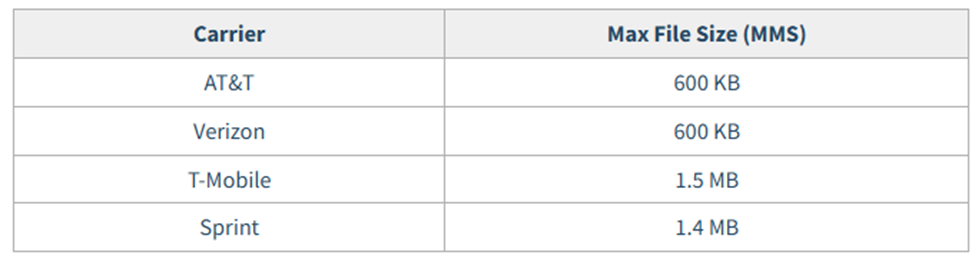
The file size exceeds carrier limits for MMS.
International Geo Permissions
Your account might not have permission to send international messages..
Contact support.
Message Body Too Long
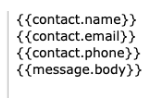
If you are using a trigger to send a message. Check the body of the message. Also, check to see if there is a custom value of {{message.body}}
For example, if someone replies via email and their email exceed the limit of 1600
characters, the message will not send if you have the custom value
{{message.body}}
Trim the message manually or modify the trigger logic to exclude large custom values
