Log out of your primary GoHighLevel agency if currently logged in.
Log into the external GoHighLevel account that owns the sub-account you wish to import.
In your Agent Suite.ai workspace, click “New Sub-account”. Choose “Direct Connection” instead of using the main agency OAuth.
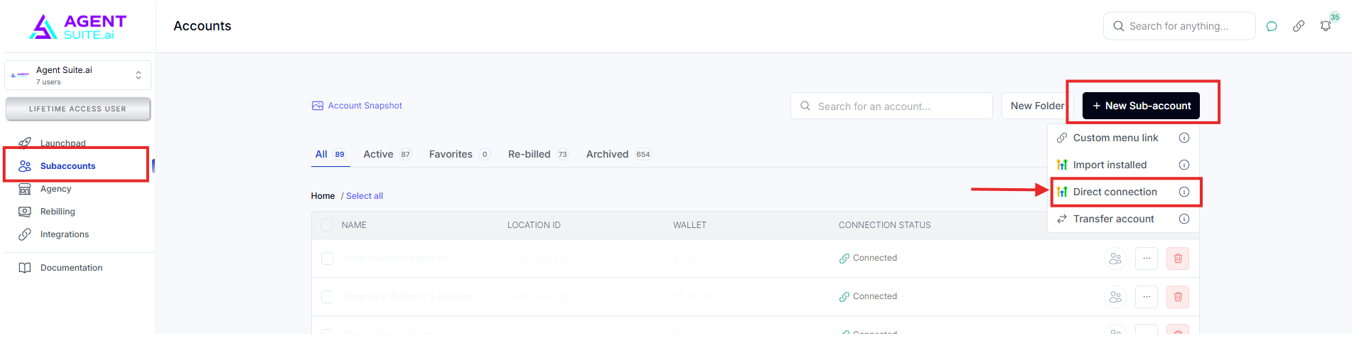
Select the specific sub-account (not the agency).
Click through and enable required permissions.
You'll be redirected to the OAuth flow.
Agent Suite.ai will create the location (if it doesn’t already exist) and connect it via OAuth.
You'll be sent to the portal where you can view past conversations or activity (if any exists from testing or prior connection).
Go back to your AgentSuite.ai dashboard.
Confirm the new sub-account appears and is marked as connected via OAuth.
If connection breaks (e.g., OAuth expires), return to the same sub-account in GoHighLevel.
Re-run the Direct Connection process. The account won’t be duplicated—it will simply re-establish the connection.
Do not use the "Connect to GHL - Use Agency Connection" toggle if the sub-account is not in your agency.
This will attempt to override with your agency permissions and break the OAuth link.
Do not share your custom menu link for outside accounts—it may create accounts incorrectly under your agency.
Instead, share the direct creation URL from your workspace like:
Instruct clients to use that URL for easier onboarding without OAuth complications.
You can manage these external sub-accounts directly from your Agent Suite.ai workspace.
Use “Open in New Tab” to access them remotely without logging in/out of multiple GoHighLevel accounts.
Sub-account is visible in Agent Suite.ai dashboard.
OAuth connection is active and stable.
Client has correct direct access link if needed.
You can remotely manage the sub-account within Agent Suite.ai .
Create a short video showing:
Logging into external GoHighLevel
Setting up Direct Connection in Agent Suite.ai
Completing OAuth
Verifying dashboard sync
Optional: Sharing the correct direct creation link
Q: What if OAuth breaks after setup?
A: Simply repeat the Direct Connection steps. It won’t duplicate the account—just reconnect.
Q: Can I use the agency connection for external accounts?
A: No, this will break the OAuth. Always use Direct Connection for non-agency sub-accounts.
Q: Can clients use my custom menu link?
A: No, doing so will cause improper account creation under your agency. Use the direct assistant creation URL instead.
