
Step-by-Step Process
If You Are Logged In (Workspace or Sub-Account):
Navigate to Settings:
From either the main workspace or a sub-account, click on Settings.
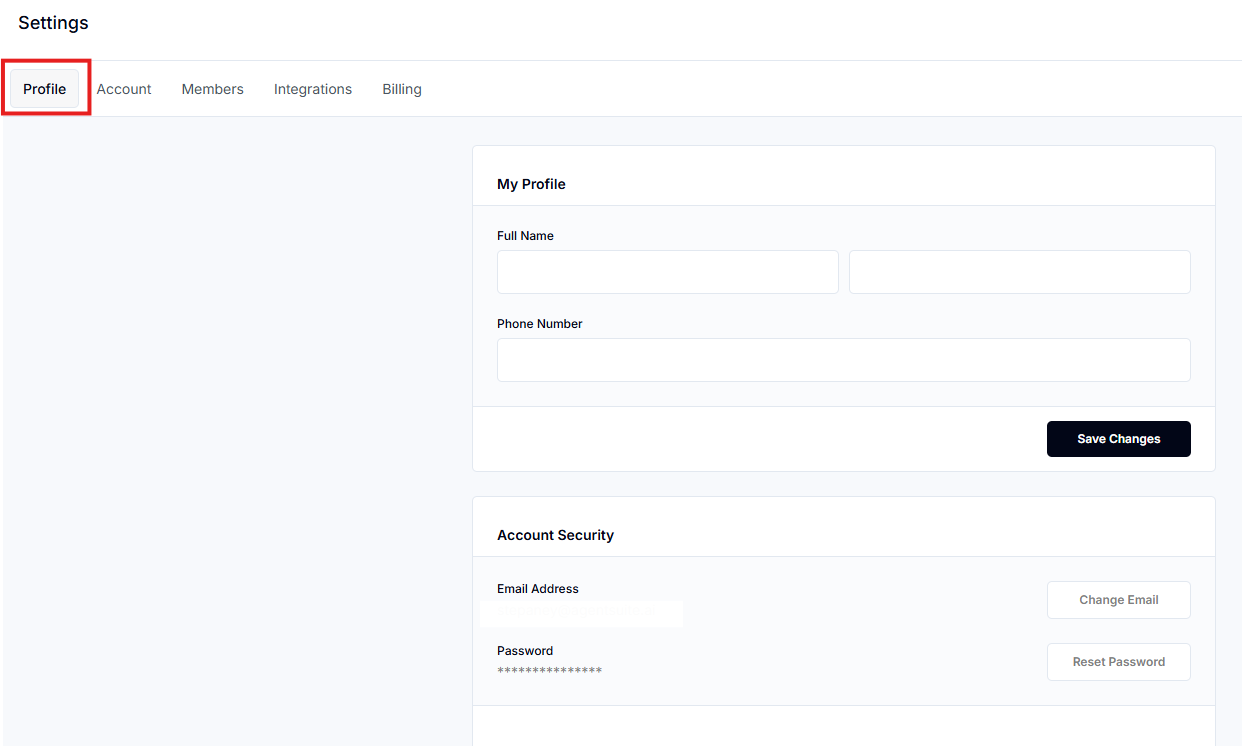
Then go to Account (for workspace) or Profile (for sub-account).
Select Reset Password:
Click on the Reset Password option.
Enter Current and New Passwords:
You’ll be prompted to enter your current password and new password.
Confirm and Save:
If all entries match, your password will be updated.
A success confirmation will be displayed.
If You Are Not Logged In:
Go to the Login Page:
Visit: https://createassistants.com/access (or relevant login URL)
Enter Email and Use 'Forgot Password':
Input your email address.
Click on the Forgot Password link.
Follow Email Instructions:
You’ll receive a password reset email.
Click the link and follow the instructions to set a new password.
FAQs
Q1: What if I forgot my current password?
Use the “Forgot Password” link on the login page.
Q2: Can I change the password from any sub-account?
Yes, the user portal works the same from both workspace and sub-account.
Q3: What URL do I use if I’m not logged in?
Use: https://createassistants.com/access